Saying So Long to Legacy (Without Breaking Everything)
How to move off a legacy ECM without a high-stakes cutover — and why the window to act is narrowing

If your organization runs a legacy ECM for managing your documents and information, you already know the symptoms. The platform handles core document storage well enough, but everything around it has become a maintenance project of its own. Integrations with other systems like your ERP and your non-negotiable compliance workflows all require custom middleware that nobody wants to touch. Multi-department access controls have been patched together over the years in ways that would be difficult to reconstruct from scratch. Regulatory requirements keep evolving, and the platform's security model wasn't designed with modern frameworks in mind.
This is especially relevant for organizations in regulated, multi-department, or multi-jurisdictional environments where documents are not just records, but evidence, obligations, transactions, and operational inputs.
For organizations managing millions of documents across complex workflows, migration can sound like a bigger problem than the one they already have. Over time, however, the gap between what the organization needs and what the legacy platform can support continues to widen.
The Real Cost of Staying Put
Legacy ECM and document management platforms were built for a different era of enterprise software. They assumed on-premise infrastructure, dedicated admin teams, and a world where documents were in their own silo, with human subject matter experts ready and able to bridge any gaps as needed.
But expectations have changed. Documents are a critical piece of larger workflows spanning compliance, operations, customer service, and multi-party processes. Automation is no longer an experiment on the edges, but a key requirement to meet rising expectations.
The costs aren't always visible on a single line item, but they are felt across the organization. They show up as integration tax: the engineering hours spent bridging your document platform to line-of-business systems that need access to the same content. They show up as architectural constraints: the inability to support multi-tenancy for different business units or external partners without standing up entirely separate environments. They show up as talent cost: the shrinking pool of people who understand the system, and the premium they command. And they show up as compliance risk, because platforms designed before modern security frameworks often require bolted-on controls rather than built-in ones.
A Legacy System Risk Register
| Risk | Description | Impact |
|---|---|---|
| Integration Fragility | Custom middleware bridging the document platform to ERP, CRM, and LOB systems. Each integration is bespoke, undocumented, and maintained by whoever built it. | System-level brittleness. New integrations delayed by months. Single points of failure in cross-system workflows. |
| Architectural Limitations | No native multi-tenancy. Limited or proprietary API surface. Scaling organizational complexity requires duplicating entire environments. | Inability to onboard new business units, clients, or partners without significant infrastructure investment. |
| Talent Concentration | Platform expertise held by a small number of specialists. Configuration, scripting, and admin models are proprietary and not transferable. | Institutional knowledge at risk of departure. Premium rates for increasingly scarce contractors. Onboarding timeline measured in months. |
| Compliance Exposure | Security model predates modern regulatory frameworks. Encryption, audit logging, and access controls are compensating measures rather than native capabilities. | Audit findings. Increased scrutiny during regulatory reviews. Difficulty demonstrating compliance posture to partners or clients. |
| Licensing Escalation | Per-seat or per-feature pricing that scales with headcount regardless of usage. Renewal cycles with limited negotiating leverage. | Rising costs disconnected from value. Budget unpredictability. Vendor lock-in compounds with each renewal. |
| Upgrade Risk | Major version upgrades that function as reimplementations. Extended testing cycles, broken customizations, potential downtime. | Deferred upgrades that compound security exposure. Months of project time consumed per cycle. Version lock as an unintended default. |
| Search and Retrieval Gaps | Limited indexing capabilities. No structured metadata queries. No AI-assisted classification or extraction. | Staff time spent manually locating documents. Duplicate content across repositories. Missed compliance and retention obligations. |
| Vendor Roadmap Dependency | Platform development priorities determined by the vendor. Features arrive on their timeline, aligned with their market strategy. | Critical functionality blocked or delayed. Workarounds and third-party tools layered in to fill gaps. Strategic initiatives stalled. |
| Data Portability | Documents stored in proprietary formats or structures. Export tooling incomplete, untested, or nonexistent. | Exit costs that grow with tenure. Reduced leverage in vendor negotiations. Difficulty conducting meaningful platform evaluations. |
| Workflow Rigidity | Automation tied to the platform's built-in workflow model. Limited event-driven capability. No real-time integration with external systems. | Manual handoffs between systems. Process bottlenecks at the document layer. Inability to automate cross-system document workflows. |
At some point, maintaining the old system costs more than replacing it. Most organizations cross that line well before they act on it, once the risk of staying on the legacy system starts to heavily outweigh the risk of migration.
But that doesn't make the risk of migration disappear.
The Two Paths Most Organizations Consider
When organizations do decide to move, two approaches dominate the conversation.
The first is to adopt a modern commercial platform. This has clear advantages: you get a proven feature set, vendor-managed updates, and a faster path to production than building internally. The tradeoffs are also well understood. Your documents live inside the vendor's system, your metadata conforms to their schema, and your integration surface is what they've chosen to expose. For organizations whose needs align closely with the platform's design, this can be the right call. For organizations with complex multi-system environments or requirements that don't fit the vendor's roadmap, the lock-in tradeoffs that motivated the original move can reassert themselves over time.
The second is to build internally. This gives you full architectural control and the ability to design around your specific requirements. It's a serious undertaking. The core document handling tends to come together within a reasonable timeframe, but the long tail of enterprise requirements adds up: granular permissions, retention policies, regulatory audit trails, workflow automation, metadata edge cases, and the ongoing maintenance that comes with running a platform rather than using one. Organizations with deep engineering teams can do this successfully, but it requires a sustained commitment that goes well beyond the initial build. The two-year estimate tends to grow.
Neither path is wrong. But both frame the decision as a binary choice between control and convenience, and most organizations want both.
A Third Path to Bridge the Gap
Between adopting another commercial platform and committing to a multi-year internal build, there's a category of solution designed to deliver enterprise-grade document and information management without requiring organizations to choose between control and capability.
FormKiQ is an API-first document and information management platform that deploys directly into your own cloud infrastructure. Your data stays within your environment, under your security policies, inside your compliance boundary. You choose where it runs, who has access, and which jurisdictions your data resides in.
The practical value is not simply that documents move into a newer repository. It's that the document layer becomes easier to govern, integrate, automate, and evolve.
- Document and records management. Metadata-rich storage, full-text and structured search, version control, and retention policy enforcement across your entire document corpus.
- Compliance and regulatory readiness. Native audit logging, data residency through deployment choice, encryption at rest and in transit, and access controls designed for regulatory scrutiny.
- Multi-tenant access and governance. Support for complex organizational structures — whether that means separate business units, client environments, external partner access, or all three simultaneously — without duplicating infrastructure.
- Intelligent document processing. AI-powered classification, data extraction, and content analysis built into the platform, turning unstructured documents into structured, actionable information.
- Integration and interoperability. Standard APIs, event-driven architecture, and identity provider integration that allow the platform to operate as a service layer within your existing technology ecosystem.
- Workflow and automation. Event-driven document workflows that span systems, triggering downstream processes as documents are ingested, classified, approved, or updated.
From that foundation, organizations can adopt specific solutions over time as their needs evolve:
- Contract management. Centralized contract lifecycle tracking with metadata tagging, version history, AI-assisted clause extraction, and automated retention policies.
- Legacy system archive. A structured destination for content migrated from retiring platforms, preserving metadata integrity and search access without maintaining the original system.
- Submission and intake management. Secure, multi-channel document intake for applications, permits, claims, or other structured submission workflows, with automated classification and routing.
- Case and records management. Document-centric case files with access controls, audit trails, and workflow triggers aligned to regulatory or operational requirements.
- Digital asset management. Centralized storage, search, and governance for media, marketing materials, and other non-document content with metadata-driven organization.
- ERP and LOB document integration. A document services layer that connects to enterprise resource planning, HR, finance, and other line-of-business systems through APIs, consolidating document access across operational silos.
The result is a platform that can serve as the document and information backbone for complex operations, fitting into your architecture rather than requiring your architecture to fit around it.
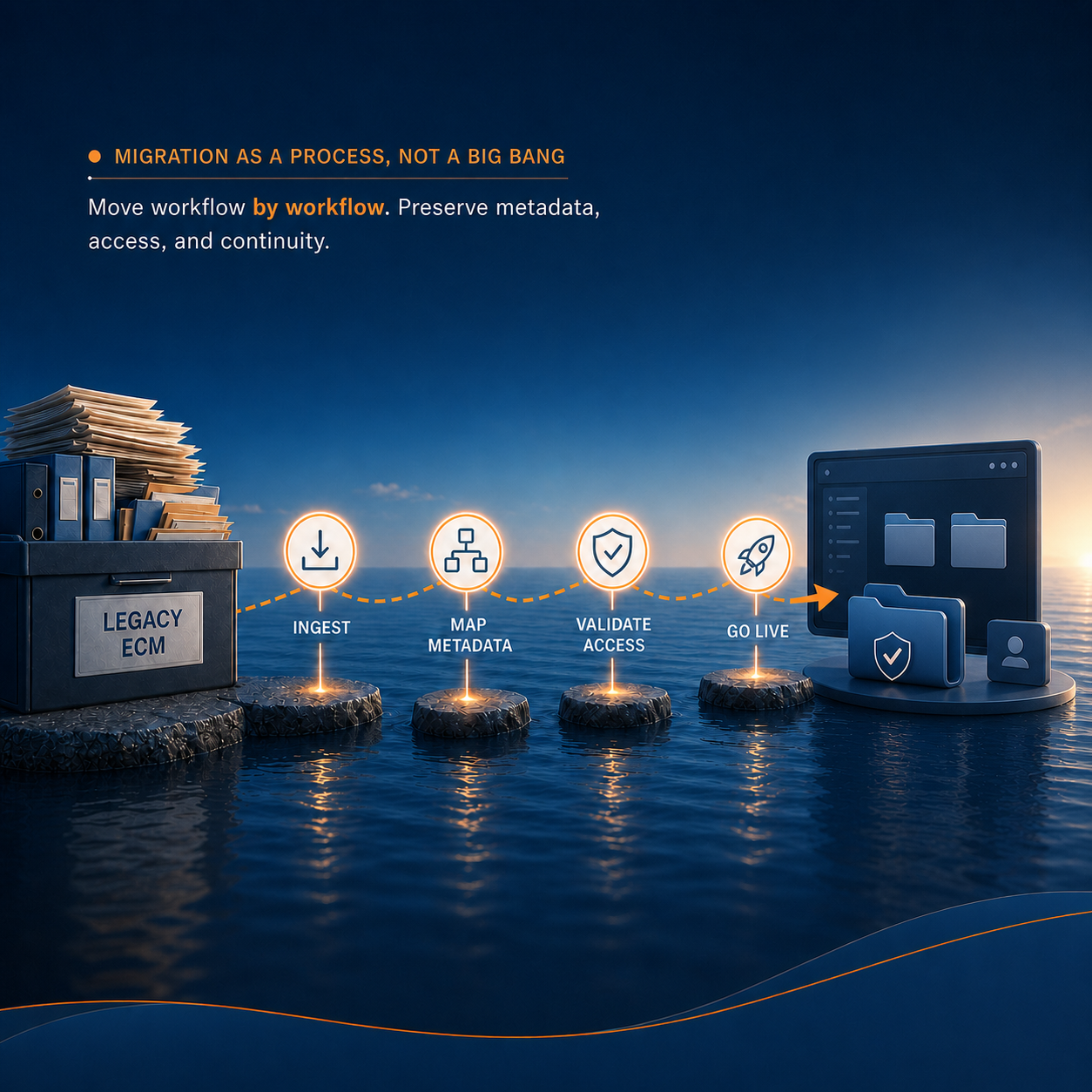
Migration as a Process, Not a Big Bang
For organizations managing millions of documents across complex workflows, a single cutover event carries significant risk. Metadata schemas, access permissions, folder structures, and integration points with downstream systems all carry years of accumulated history and assumptions. Trying to map everything upfront and execute a clean switch is possible, but it's also where many migration projects stall.
FormKiQ supports phased migration. It can run alongside an existing system, ingesting documents incrementally while both platforms remain operational. Metadata mapping happens as part of the ingestion process. Search indexes build progressively as documents arrive. Teams can transition workflow by workflow, department by department, validating each stage before moving to the next.
This doesn't eliminate the complexity of migration, but it does change the shape of it. Rather than a high-stakes cutover with a fixed deadline, migration becomes a managed process with clear checkpoints and the ability to adjust course as the real-world messiness of legacy environments reveals itself.
What Changes, What Continues
The goal of replacing a legacy system isn't to replicate it. It's to carry forward the value — your documents, your metadata, your institutional knowledge — while gaining the flexibility to operate differently going forward.
FormKiQ provides full-text and structured search, metadata management, granular access controls with multi-tenant isolation, audit logging, and workflow automation. It also introduces capabilities that may not have been available in the legacy environment: native multi-tenancy, AI-powered classification and extraction, event-driven integrations, and an API-first design that allows other systems to interact with the document layer programmatically.
At the same time, aspects of the legacy model don't carry forward. Traditional per-seat licensing can give way to pricing models better aligned with platform usage, deployment scope, and organizational growth. Proprietary storage formats give way to standard cloud services. Vendor-controlled upgrade cycles give way to an architecture designed to support ongoing updates without turning every major change into a reimplementation project.
Data Portability and Platform Independence
One of the more practical questions in any platform evaluation is what happens to your data over time: where it lives, how it's governed, and what your options are if circumstances change.
FormKiQ offers three deployment models, each with different tradeoffs around control, operational responsibility, and infrastructure management. Organizations can deploy into their own cloud account, giving them direct ownership of all infrastructure and data. They can opt for a FormKiQ-managed environment in a segregated account, reducing operational overhead while maintaining data isolation. Or they can start with the open-source edition under an MIT license, evaluating the platform with full access to the codebase before making a commercial commitment.
Across all three models, documents and metadata reside in standard, well-documented cloud services rather than proprietary formats. This means data portability isn't a feature that has to be requested or negotiated. It's a consequence of how the platform is built. Whether an organization manages its own infrastructure or FormKiQ manages it on their behalf, the underlying data remains accessible through standard interfaces and isn't dependent on the platform's continued involvement.
This is worth evaluating concretely during any platform selection process. The meaningful test of openness isn't what a vendor claims, but whether your data remains accessible and portable in practice.
Starting the Conversation
If your legacy document management system has become more of a constraint than a foundation, and the workarounds your team has built around it now carry their own maintenance burden, it's worth exploring what a transition looks like in practice.
FormKiQ offers a path that preserves what matters — your documents, your metadata, your workflows, your compliance posture — while moving to infrastructure designed for how complex organizations operate today. The migration doesn't have to happen all at once, but the planning is worth starting before the next licensing renewal sets the timeline for you.