Why FormKiQ's Document Management Architecture Runs on Segregated Serverless Infrastructure
The architecture decision that matters more than who operates the account

Most conversations about document management deployment start with a familiar question: should you run it yourself, or should the vendor run it for you?
That question matters, but it is not the first question I would ask.
The bigger architectural question is this: does the platform run on shared multi-tenant application infrastructure, or does each deployment get its own segregated cloud-native environment?
That difference affects cost, scaling, troubleshooting, auditability, incident containment, and increasingly, how quickly and reliably organizations can migrate and ingest large volumes of documents.
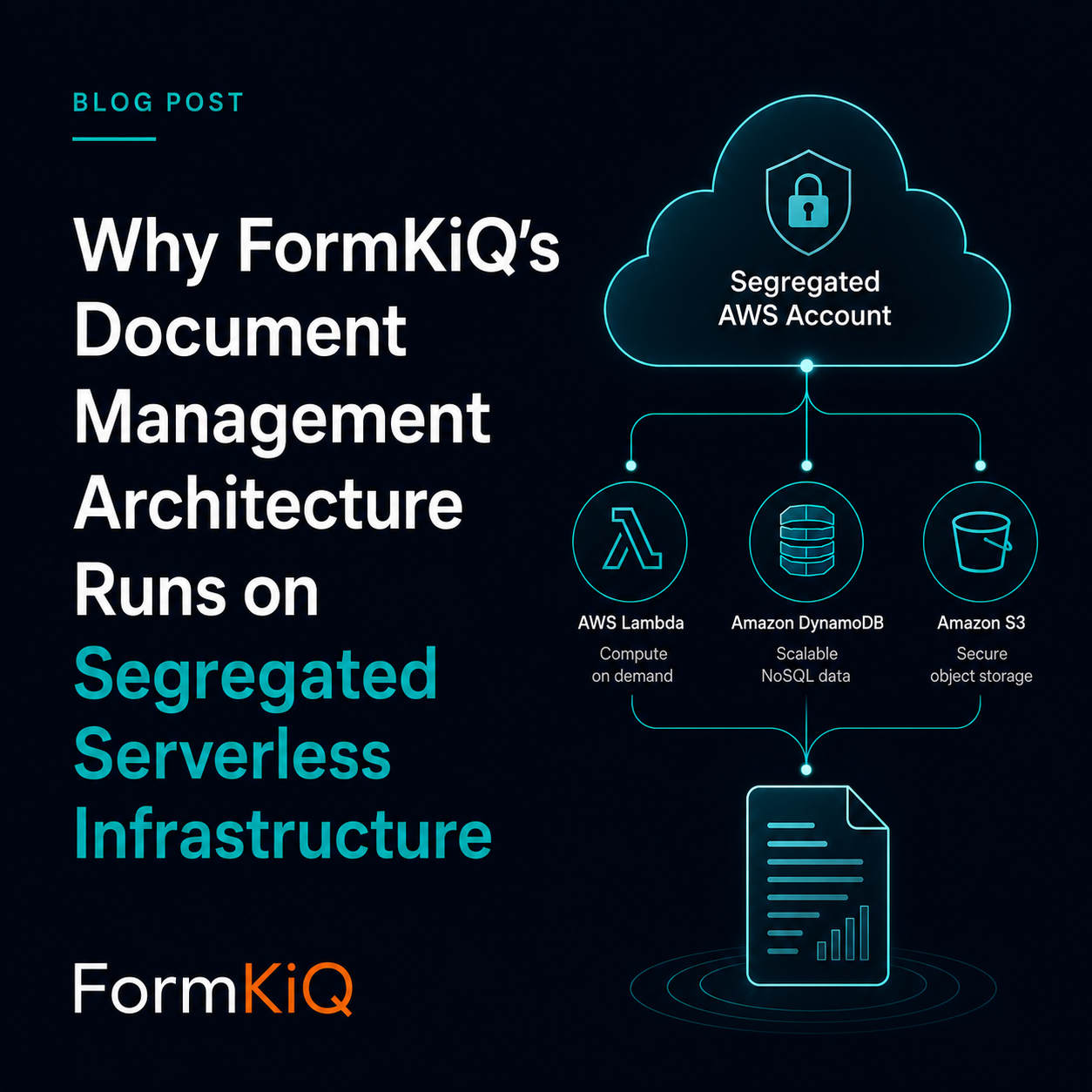
FormKiQ is built on AWS Lambda and Amazon DynamoDB, deployed into a segregated AWS account. That choice has nothing to do with whether your team or FormKiQ operates that account. It has everything to do with what kind of infrastructure your documents, metadata, workflows, and ingestion workloads sit on.
This is not about whether cloud providers share underlying hardware. They do. The important distinction is whether your document management workload runs inside a segregated AWS deployment, or inside a shared multi-tenant application and data layer operated across many customers.
Shared Multi-Tenant Applications vs. Segregated Serverless Deployments
Many document management and content management platforms run on shared application infrastructure: a common application tier, a shared database, shared indexing services, and shared operational telemetry. Your data and workload may be separated logically by a customer ID, tenant flag, schema, partition, or permission model.
That is a normal way to build SaaS software, and it can work well.
But it also means your performance, operational visibility, and incident boundaries are tied to a larger shared platform. The vendor may operate that platform well, but your workload is still one tenant inside a shared application and data plane.
A segregated serverless architecture takes a different approach. Each deployment runs in its own AWS account, using managed services like Lambda, DynamoDB, S3, CloudWatch, and EventBridge. The scaling boundary is the deployment, not a tenant row inside a shared application database.
There is no shared FormKiQ application cluster to contend with, no shared FormKiQ database where another customer's access pattern can affect yours, and no need to diagnose your ingestion workload through platform-wide averages.
| Area | Shared multi-tenant application architecture | Segregated serverless architecture |
|---|---|---|
| Compute | Shared application or container fleet across customers | Per-account elastic compute using AWS Lambda |
| Data storage | Shared database or shared application data layer | Per-account DynamoDB tables and S3 buckets |
| Ingestion workload | Competes within the vendor's shared platform capacity | Runs inside the deployment's own AWS account and service limits |
| Noisy-neighbor risk | Another tenant's load can affect shared application components | Not caused by another FormKiQ tenant; the deployment scales independently within AWS service limits |
| Capacity planning | Vendor provisions for aggregate platform load | No application server fleet to size for peak load |
| Observability | Platform-level metrics, often summarized per tenant | Account-level CloudWatch, Logs Insights, and DynamoDB Contributor Insights available to the operator |
| Security and compliance boundary | Logical tenant separation inside shared infrastructure | Dedicated AWS account-level isolation boundary |
| Incident scope | Investigation may begin inside a shared application environment | Designed to be scoped to a single deployment/account |
This is not a claim that shared multi-tenant SaaS is poorly built. It is a different architectural model with different tradeoffs.
Those tradeoffs matter more in regulated industries, where data residency, audit boundaries, incident containment, ingestion performance, and migration assurance are part of the evaluation criteria, not an afterthought.
Why This Matters More During Onboarding Than People Expect
The first real test of a document management platform is often not day-to-day usage.
It is onboarding.
A new customer may need to migrate hundreds of thousands or millions of documents from a legacy repository. They may need to preserve folder structures, metadata, access rules, retention requirements, object relationships, document types, version history, or source-system identifiers. They may also need to validate that the import was complete and accurate before the legacy system can be retired.
That makes migration and ingestion both a technical problem and a trust problem.
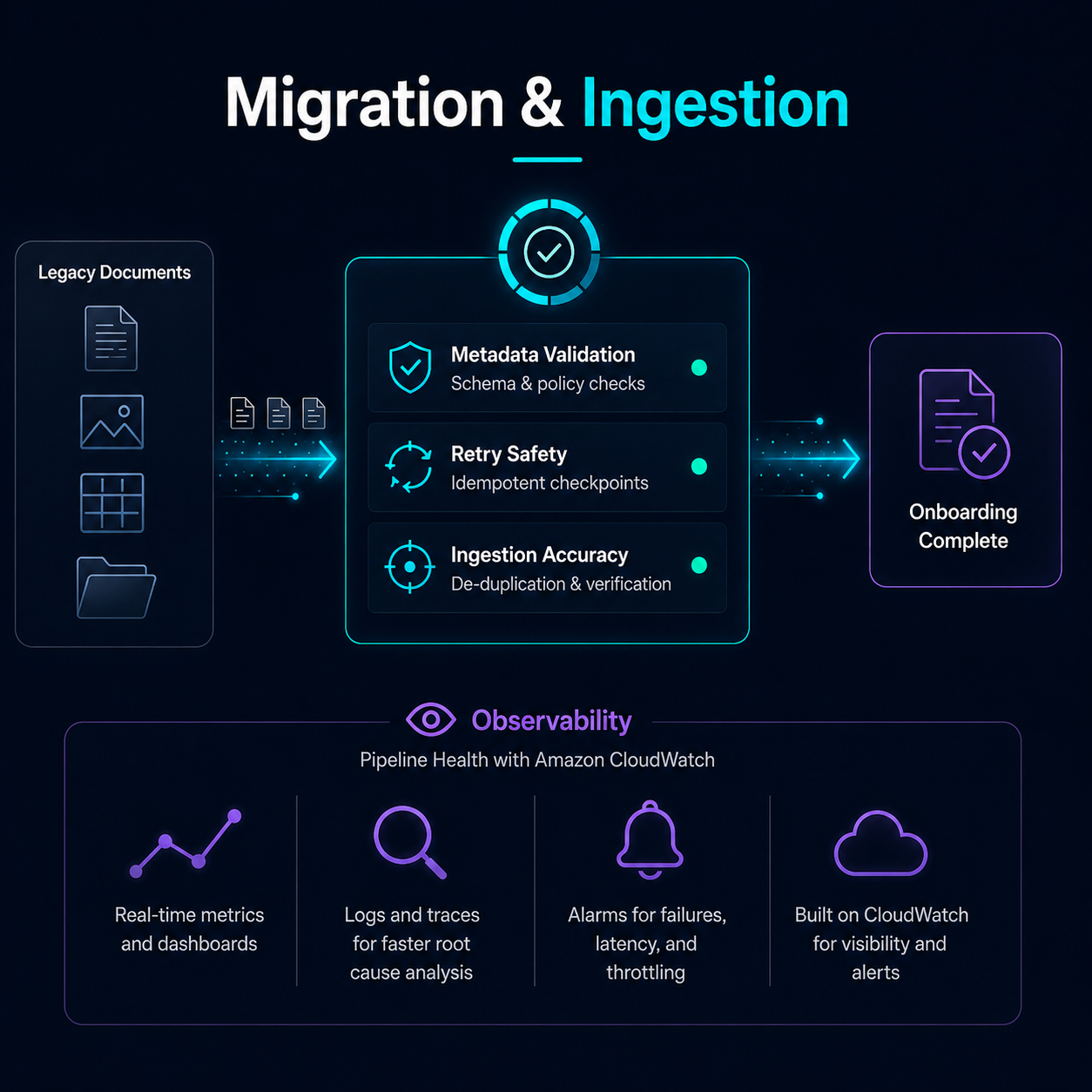
Customers increasingly want to know:
- how quickly a large document collection can be loaded;
- whether metadata can be applied accurately during ingestion;
- whether failures can be retried safely;
- whether import throughput can be increased without affecting other customers;
- whether bottlenecks can be diagnosed precisely;
- whether the migration process leaves behind enough auditability to prove what happened.
This is where the architecture starts to matter.
In a shared multi-tenant system, a large migration can become an exception case. It may require special scheduling, throttling, temporary capacity planning, or coordination with the vendor's shared platform operations team. That may be reasonable, but it also means the migration is being fitted into a platform designed around aggregate usage across many customers.
With a segregated serverless deployment, the migration workload runs inside the customer's own deployment boundary. The import process can be monitored, tuned, retried, and scaled in the context of that account. The operational question becomes much more specific: what is this workload doing, where is it constrained, and what should be adjusted?
That is a very different starting point.
What Segregation Buys You, Regardless of Who Operates It
A segregated AWS account does not require you to operate FormKiQ yourself.
The same architectural benefits apply whether your team manages the AWS account directly or FormKiQ operates a dedicated account on your behalf.
- Elastic scaling without shared application capacity. Lambda and DynamoDB scale to the workload inside the deployment. A large import job, traffic spike, or unusually active workflow does not compete with another FormKiQ customer's workload inside a shared FormKiQ application tier.
- Clearer ingestion and migration diagnostics. When a migration slows down, you are not guessing from platform-wide averages. CloudWatch metrics, Lambda logs, DynamoDB metrics, and Contributor Insights can be analyzed for that deployment specifically.
- A real observability boundary. Account-level telemetry belongs to the deployment. The operator can inspect request patterns, Lambda performance, DynamoDB access patterns, throttling, retries, queue depth, and other operational signals without separating them from unrelated customer activity.
- Smaller and clearer incident boundaries. A performance issue, misconfiguration, or security investigation can be scoped to one deployment instead of starting inside a shared application environment.
- A compliance boundary that maps to something concrete. "Your documents and metadata live in this AWS account and region" is much easier to explain than "your data is logically separated inside our shared application infrastructure."
- Cost that follows usage, not provisioned application capacity. There is no FormKiQ server fleet sized for peak load sitting idle the rest of the time. The platform relies on managed AWS services that scale with the workload.
None of this removes the need for good architecture, good limits, good monitoring, or good operational discipline. Serverless does not make bad access patterns disappear. It does, however, make the boundaries clearer and the diagnostic path much more direct.
Two Ways to Get There
FormKiQ supports both operating models on top of the same architecture.
Customer-Managed AWS
You deploy FormKiQ into your own AWS account and operate it directly. This gives your team full control, your existing AWS relationship, your existing security tooling, and direct ownership of the environment.
Vendor-Managed
FormKiQ operates a dedicated, segregated AWS account on your behalf. You get the same account-level isolation and telemetry without staffing the operational work yourself.
Neither model is the "real" version of FormKiQ, and neither is a compromise.
They are two ways of operating the same segregated serverless architecture. The right choice depends on your team's capacity, AWS footprint, governance requirements, security model, and compliance posture.
Hybrid and regional deployment patterns follow the same principle for organizations with split requirements across jurisdictions, business units, or regulatory environments.
This Isn't Theoretical
We ran into this during a real customer migration.
The import path was handling very large document collections, but under load it slowed down badly. Because the workload was running in its own AWS account, with CloudWatch and DynamoDB Contributor Insights available for that deployment, we were able to trace the issue to a single hot partition caused by an overly aggressive metadata update pattern.
That diagnosis did not require adding servers, resizing a cluster, or guessing based on platform-wide averages. We could see the workload clearly, identify the partition key and sort key involved, and fix the access pattern.
After the change, Lambda p95 latency dropped from just over 12 seconds to 61 milliseconds.
The full diagnosis, including the CloudWatch metrics, Contributor Insights queries, and code-level fix, is written up here: From 12-Second p95 to 61ms: Optimizing a Serverless AWS Application.
That level of diagnosis is only possible when the workload has its own account-level telemetry to look at. In a shared multi-tenant application environment, the same bottleneck may be much harder to isolate from other customers' traffic, aggregate platform metrics, and shared operational limits.
This matters because ingestion is not a side concern anymore.
For many organizations, the migration into a new document management system is one of the highest-risk parts of the project. It is where speed, accuracy, auditability, and confidence all meet. The system has to load the documents, apply the metadata, preserve the required relationships, identify failures, and give the team enough visibility to trust the result.
A segregated serverless architecture does not automatically solve every migration problem. But it gives the migration workload a clearer place to run, a clearer boundary to monitor, and a clearer diagnostic path when something needs to be improved.
The Architecture Is the Constant
Customer-managed, vendor-managed, hybrid, and regional deployments are operating models. They answer the question of who runs the environment and where it should live.
The more important question is what the environment actually is.
With FormKiQ, the constant is a segregated AWS deployment built on cloud-native managed services. That architecture is what determines how the system scales, how clearly issues can be diagnosed, how incidents are contained, and how directly the deployment can map to residency and compliance requirements.
Once that architecture is in place, the operating model becomes a practical decision: who has the right team, tooling, and compliance requirements to run it?
Start with the Architecture
If you are evaluating document management platforms, start by asking where the workload actually runs, what is shared, what is segregated, and what telemetry you can see when something goes wrong.
That question matters during normal operation.
It matters even more during migration and ingestion, when large volumes of documents, metadata, and validation requirements have to move through the system quickly and accurately.
FormKiQ Core is open source and deployable into your own AWS account, which makes it a practical starting point for architecture validation and early implementation.
For production deployments, FormKiQ Essentials and Advanced add the operational, governance, and workflow capabilities needed by departments and larger organizations.
For enterprise environments with residency, sovereignty, assurance, or multi-jurisdiction requirements, FormKiQ can support customer-managed, vendor-managed, hybrid, or regional deployment models on top of the same segregated serverless architecture.